 Lamellar Strength
Table of contents
About
The through-thickness toughness can be evaluated with the “Lamellar Strength” according to Eurocode 3 EN 1993-1-10. A verification model is saved in system “Lamellar Strength” in “WeldToolkit-StrengthVerification_VXYZ.wbpz”, see the downloads page.
Usages
The lamellar tearing may be neglected if the following condition is satisfied: ZEd <= ZRd where ZEd is the required design Z-value resulting from the magnitude of strains from restrained metal shrinkage under the weld beads. ZRd is the available design Z-value for the material according to EN 10164, i.e. Z15, Z25 or Z35.
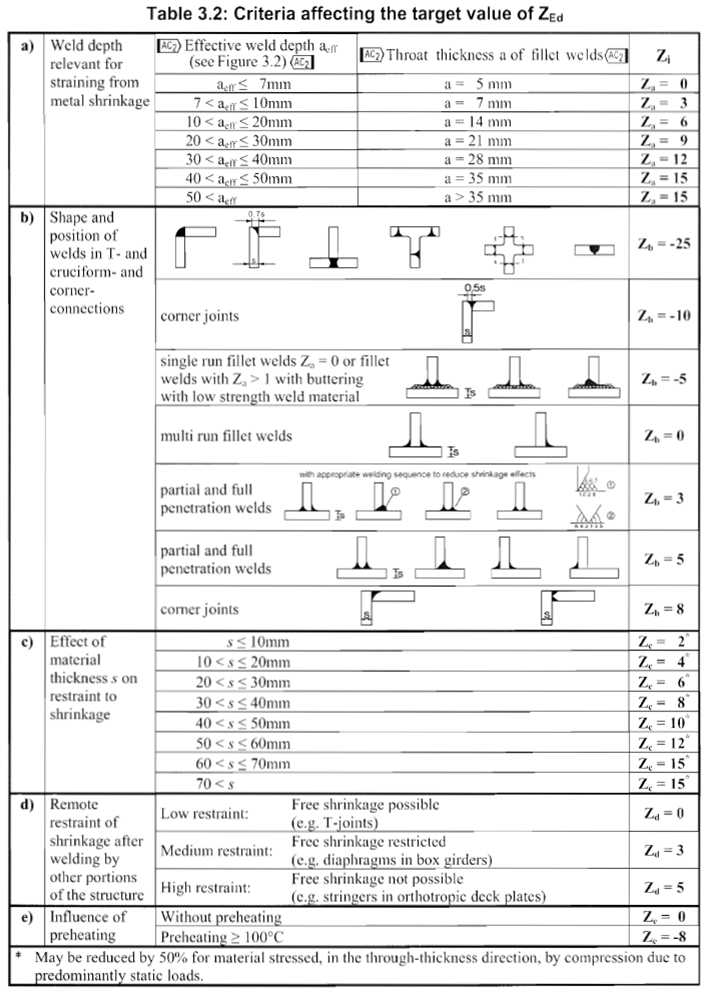
The required design value ZEd may be determined using: ZEd = Za + Zb + Zc + Zd + Ze In which Za, Zb, Zc, Zd and Ze are given in Table 3.2.
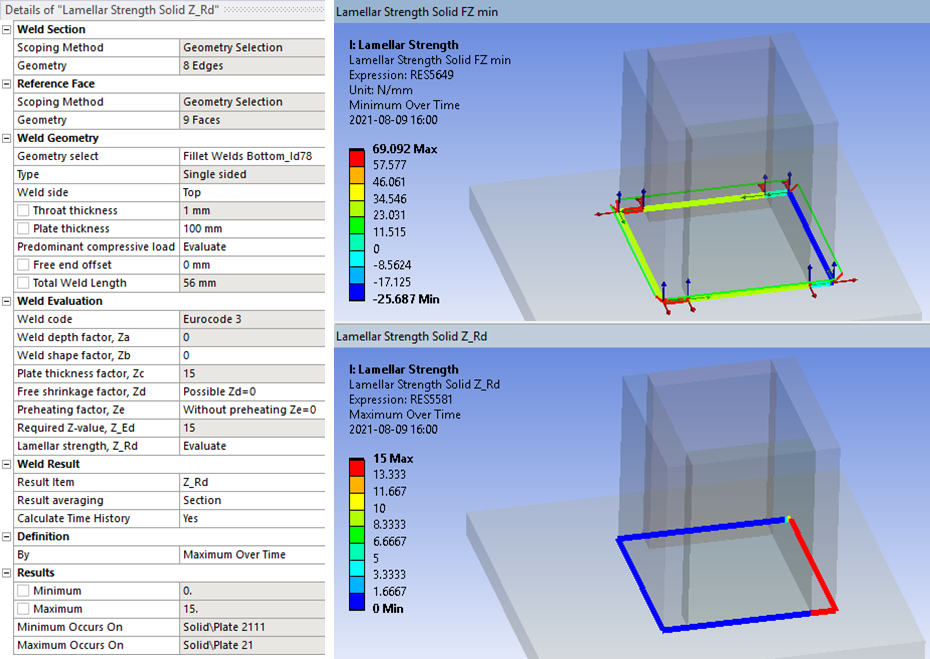
Select a weld to evaluate either by “Manual Select” or by a pre-defined fillet weld from the list. Set the throat plate thickness. The values for Za and Zc are automatically defined. To analyze if the weld has “Predominant compressive load” leave the list box at “Evaluate” otherwise set the value to “Yes” or “No”. If “Yes” this parameter reduces Zc by 50%.
Based on the weld geometry select “Weld shape factor, Zb” from the list, see figure below. Select options for “Free shrinkage factor, Zd” and “Preheating factor, Ze” from the list. The required maximum Z-value, ZEd, is listed based on the inputs. The lamellar strength, ZRd, can be selected from the list or set to “Evaluate”.
Inputs to the Lamellar Strength are defined in the table below.
| Weld Section | |
|---|---|
| Scoping Method | Geometry Selection (Default)/Named Selection |
| Geometry | Weld section edges at the weld root. |
| Reference Face | |
| Scoping Method | Geometry Selection (Default)/Named Selection |
| Geometry | Reference Faces connected to the Weld Section edges. |
| Weld Geometry | |
| Geometry select | Manual select (Default)/Manual select weld part/Weld object (i) |
| Type | Single sided (Default)/Double sided/Single sided intermittent/Double sided intermittent. See Type. |
| Weld side | Top/Bottom/Top&Bottom. Position of the weld seam in relation to the Reference Face See Weld side. |
| Throat thickness | Throat thickness amin (Default 3 mm) |
| Plate thickness | Plate thickness s (Default 0 mm) |
| Predominant compressive load | Yes/No/Evaluate (Default) |
| Free end offset | Inactive weld length on an open weld chain (Default 0 mm). Used to calculate total effective weld length. |
| Weld fraction | Ratio of Total Weld Length to Total Section Length, Lweld/Lsection (Visible for intermittent welds). |
| Total Weld Length | Length of the weld seam Lweld to help estimate welding time and cost (Read only). |
| Weld Evaluation | |
| Weld Code | Eurocode 3 (Default) Weld Code to use. |
| Weld depth factor, Za | 0 (Default) |
| Weld shape factor, Zb | -25/-10/-5/0 (Default)/3/5/8 |
| Plate thickness factor, Zc | 2 (Default) |
| Free shrinkage factor, Zd | Possible Zd=0 (Default)/Restricted Zd=3/Not possible Zd=5 |
| Preheating factor, Ze | Without preheating Ze=0 (Default)/Preheating>100degC Ze=-8 |
| Required Z-value, Z_Ed | 0 (Default) |
| Lamellar strength, Z_Rd | -/Z15/Z25/Z35/Evaluate (Default) |
| Weld Result | |
| Result Item | Select a Result Item to display (ii). |
| Result averaging | Section (Default)/Group. See Result averaging |
| Calculate Time History | No (Default)/Yes/Yes (Maximum Over Time)/Yes (Minimum Over Time). |
| Scale Factor Value | Scale factor on the calculated loads, e.g. load factor γL. |
| Definition | |
| By | Time (Default)/Result Set/Maximum Over Time/Time Of Maximum (standard Mechanical feature) (iv). |
| Display Time | Load step time for results evaluation (v). |
(i) Geometry select
To post-process an Add Fillet Weld or Virtual Weld select the object from this list. To avoid duplicate names the weld object Id number is appended to the name. When selecting a weld object the weld scoping and dimensions are retrieved.
(ii) Result Item
The available Result Items are: Section Length (Y)/Min thickness/Z_Ed/Z_Rd/FX (radial)/FY (parallel)/FZ (axial)/Fsum/MY (parallel)/Weld angle
(iv) By
By using “Maximum over Time” the evaluation of “Predominant compressive load” checks all load steps to determine if the weld is in compression when calculating the ZEd and ZRd.
(v) Display Time
You may only use time steps where there are results saved, see the graph and tabular data window for load steps to use.
Verification
The lamellar strength case tests the influence of an always compressive load in a weld section compared to a load that changing between tension and compression.
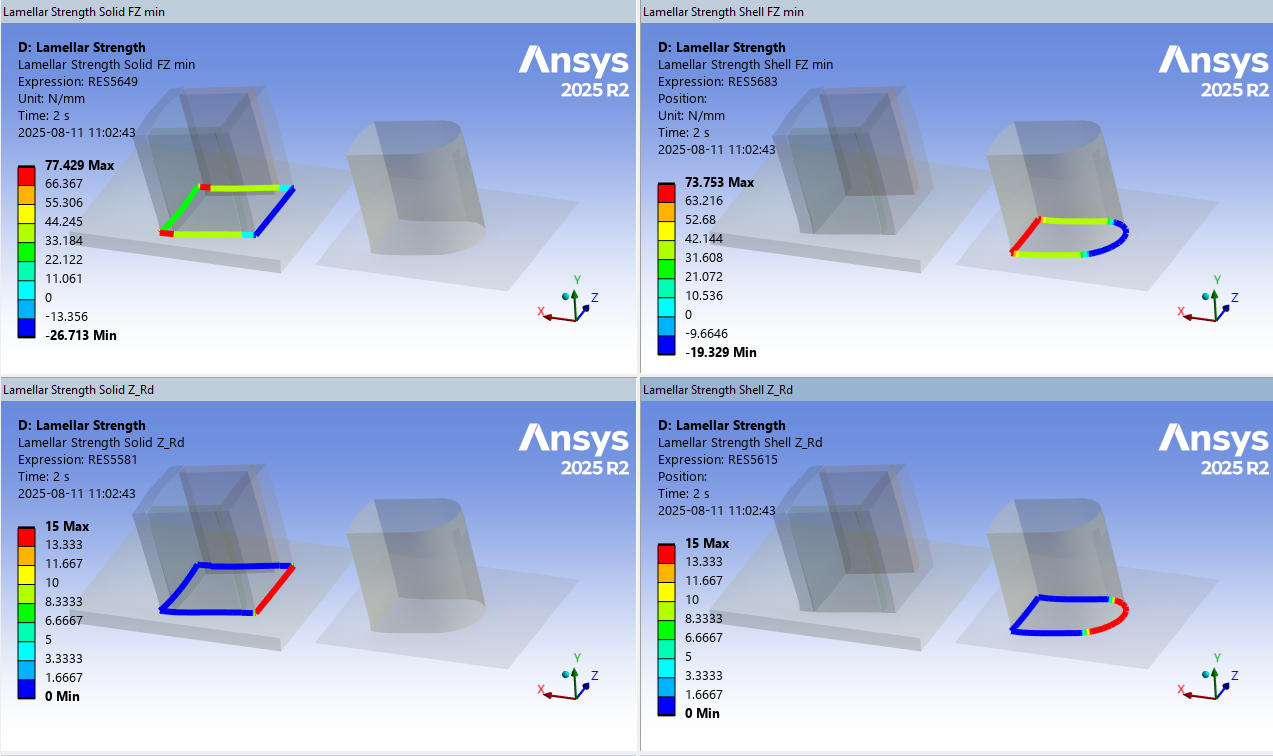
A verification example is found in the “WeldToolkit-StrengthVerification” model. See Weld Strength Verification section.