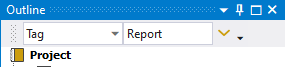
Tag Features
Report content is identified by the Tag “Report”.
The new Report Settings “Use Word Template as Tag = Yes” will allow to have individual Tags for each report template.
Any object may have multiple Tags but it is the setting of “Use Word Template as Tag” that selects what is exported in the report.
Tag Report Objects
Click to apply the current Tag name (“Report” or “Word template name”) to selected objects.
Bookmarks and Cross-reference
When selecting any object in the model tree such as a Load, Result, Figure or Image and clicking “Tag Report Objects” the Word cross-reference field text string is also copied into the Windows “Clipboard”. This string can be pasted into any Comment and used to reference to that specific object using the Word “Bookmark” and “Cross-reference” features.
When the report is created all objects that has been cross-referenced in Comments will be marked with a bookmark name. The Word macro will convert the bookmarked objects and references to the corresponding fields in the Word document. The conversion requires that the macros in the Word template are updated according to the documentation.
It is not needed to use the Bookmark Objects that renames the objects in the model tree.
If the object is already named as a bookmark e.g. “[Mesh#Id15_Sec_Mesh#]” that bookmark name is used in the cross-reference string when using Tag Report Objects.
 Un-Tag Report Objects
Click to remove the current Tag name (“Report” or “Word template name”) from selected objects.
This will also remove the bookmark formatting of the object (if defined).
 Filter Report Objects
Click to toggle the model tree filter to show only objects with the current Tag name (“Report” or “Word template name”) or to reset the filter to show all objects.
This is the same as setting “Filter: Tag=Report” in the Tree Filter.